RedNova: From arbitrary file write to command execution using COM in windows

Imagine a scenario where you are a low-privilege user who can write files as SYSTEM on the filesystem, and you want to abuse that primitive to achieve command execution.
On top of that, you want to do it all from a single executable, you drop just one binary and immediately achieve command execution, with no user interaction required.
There are many ways to turn an arbitrary file write into command execution. They range from DLL hijacking to dropping a scheduled task file, and more. One less common path is through a COM server that is implemented as an executable rather than a DLL.
COM hijacking is a well-known technique when the COM server is implemented as a DLL: you overwrite that DLL with a malicious one, and when the COM object is activated, your DLL is loaded into the victim process. But when the COM server is implemented as an executable (out-of-process, a local server), it can also be hijacked and abused to achieve command execution.
RedSun
A few months ago, a security researcher going by the name Chaotic Eclipse began dropping multiple Windows zero-day exploits following a dispute with Microsoft. The series started with an exploit called BlueHammer, and from there a steady stream of exploits followed, targeting then-unpatched vulnerabilities. Honestly, I lost count of how many were dropped, and of which are patched and which aren't.
I won't cover all of those exploits or their patch status today. Instead, I want to focus on one that caught my attention: RedSun, a local privilege escalation (LPE) exploit that lets a low-privileged user obtain an arbitrary file write as SYSTEM within the Windows filesystem.
I also won't dig into the underlying vulnerability behind RedSun, plenty of others have already done that. What interested me was how the exploit converts that file-write-as-SYSTEM primitive into command execution, and that's what I'll walk through here.
How RedSun achieves execution
RedSun is a single executable that a low-privileged user runs, and from which they end up with a SYSTEM-level command prompt.
Once it has obtained the arbitrary file write as SYSTEM, the exploit copies itself into C:\Windows\System32\ as TieringEngineService.exe — a COM server that exposes a COM object of the same name. The low-privileged process then activates that COM object (starting the COM server) by calling CoCreateInstance with the object's CLSID. As a result, the planted executable runs as SYSTEM.
Inside that executable is a check: if the process detects that it is running as SYSTEM, it reads the original user's session from a named pipe and spawns a cmd in that session as SYSTEM.
The interesting part is that the TieringEngineService COM object can be activated by a low-privileged user yet runs as SYSTEM, which is not the usual COM behavior. Normally a COM object runs as the interactive user, under the identity of whoever activated it. This one runs as SYSTEM instead.
The TieringEngineService COM object
The TieringEngineService COM object isn't a typical COM object, because it's tied to a Windows service called Storage Tiers Management (I'll come back to this class of COM object later). This service relates to storage optimization, from what I've read, the system uses it to manage and move data between different tiers of storage (e.g. faster and slower drives).
The screenshot above shows the properties of this COM object as obtained through OleViewDotNet. We can see that the server is implemented in TieringEngineService.exe.
If we check the AppID we can see it has no RunAs value the field that would normally tell us which security identity the COM server runs under. Instead, it has a Service value, which maps to the TieringEngineService service.

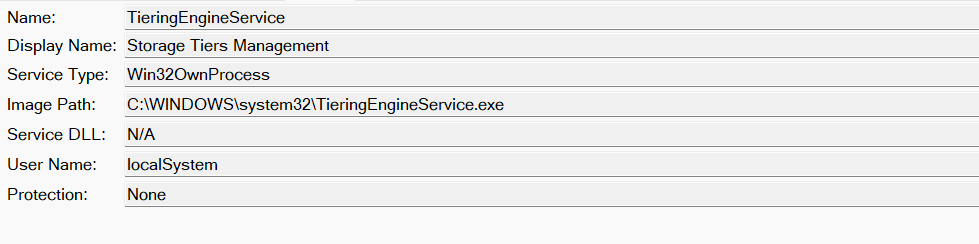
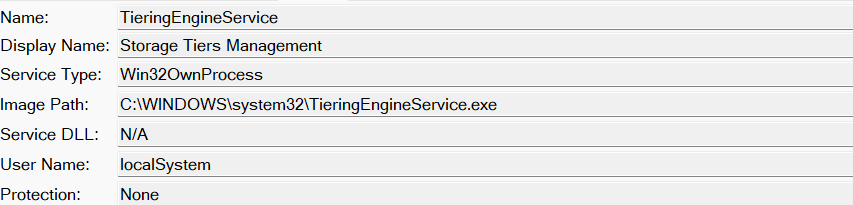
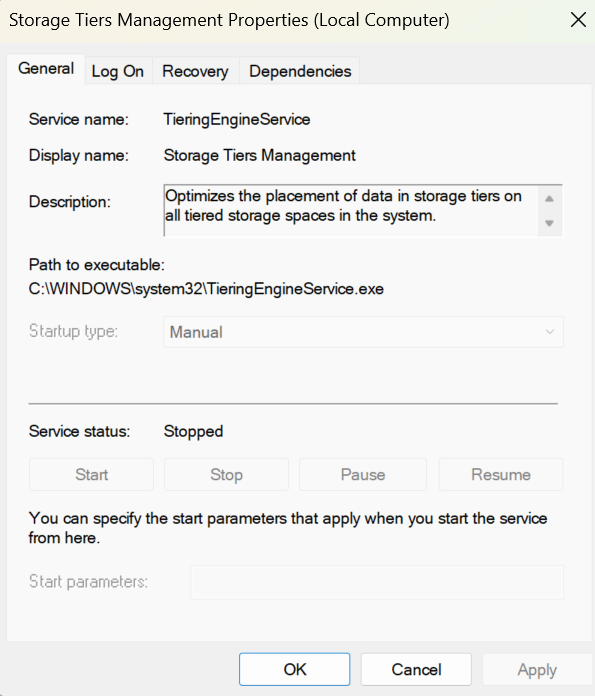
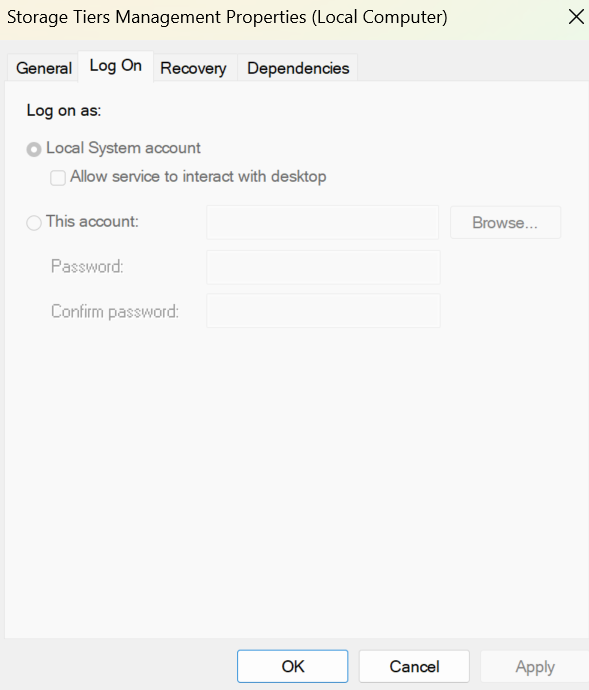
If we inspect that service — either in OleViewDotNet or in the Windows Services GUI — we can see it runs as SYSTEM. Both screenshots below show this.
Returning to the AppID: if we check the Launch Permission (which users are allowed to launch this COM object), we can see that all authenticated users are permitted to do so.
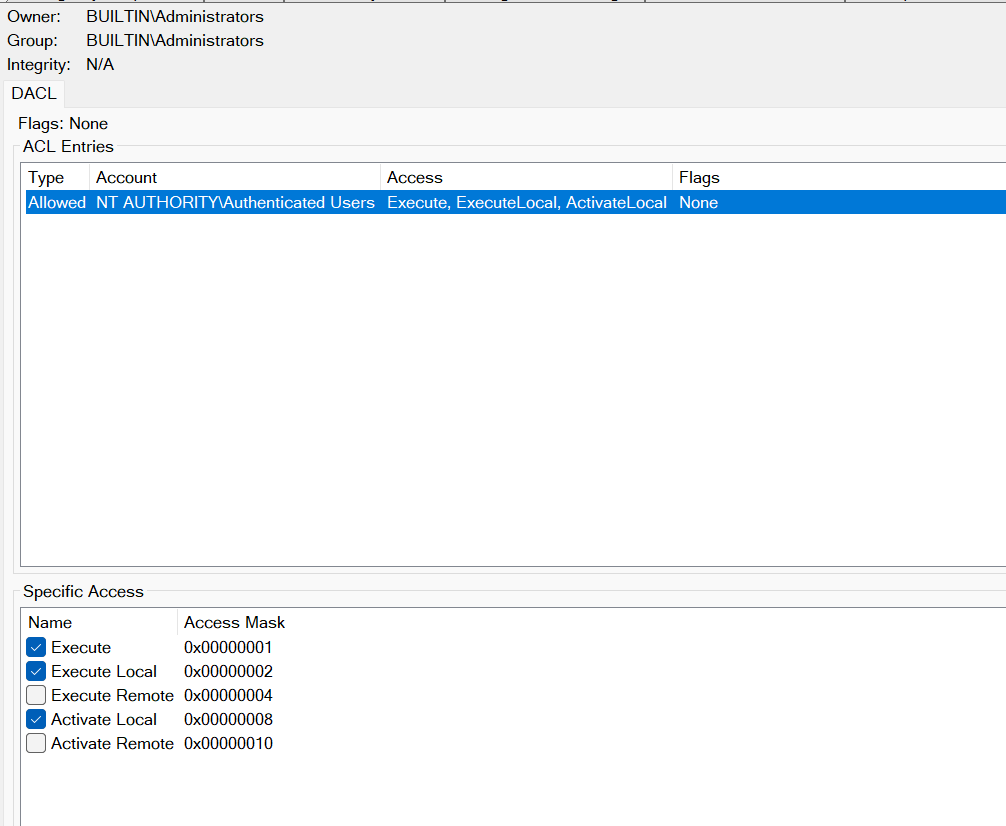
The Access Permission (who may access the interfaces and call the methods the object exposes), however, is empty. An empty value means access falls back to the machine-wide Default Access Permission for COM/DCOM (dcomcnfg → My Computer → Properties → COM Security → Access Permissions → "Edit Default").
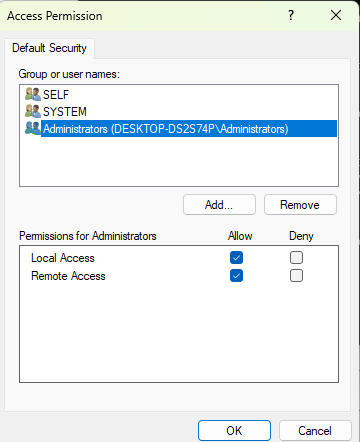
The screenshot above shows that ACL and as we can see, only higher-privileged users can access the object by default.
Watching it happen
Now, if we run Process Explorer and filter for TieringEngineService.exe, then open PowerShell as a low-privileged user and run:
[Activator]::CreateInstance([Type]::GetTypeFromCLSID("50D185B9-FFF3-4656-92C7-E4018DA4361D"))Process Explorer shows TieringEngineService.exe being launched, and if we check its security properties, we can see it runs as SYSTEM.
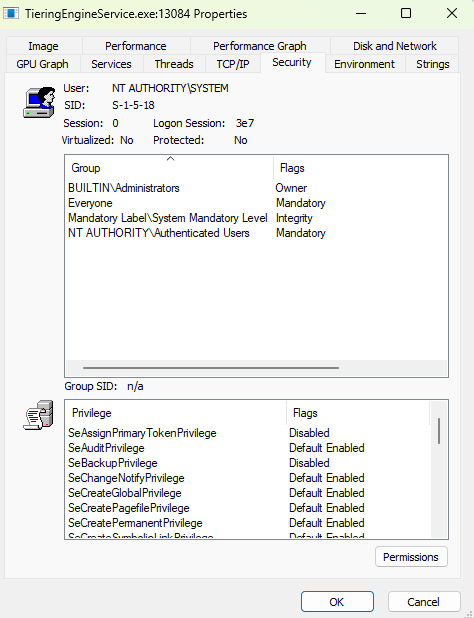
In PowerShell, though, you'll get an Access Denied error because low-privileged users have no access permission for this object, as we saw earlier. They do, however, have launch permission

So a low-privileged user was able to launch an executable and run it as SYSTEM, regardless of whether that user can access the object afterward. That's precisely what RedSun weaponized to turn its filesystem-write vulnerability into command execution.
It's a clever move: you don't need to drop a DLL, or plant something in the Startup folder, the whole chain is carried out with a single executable.
After studying the exploit, I wondered whether there are other COM objects that could be weaponized the same way to turn an arbitrary file write into command execution. Which ones are they, and how do we find them? That question led to this article, which I've named RedNova, inspired by the RedSun exploit.
COM as a service
A COM server can be implemented as an EXE, in which case it's called an out-of-process server, or as a DLL, in which case it's called an in-process server.
A COM server can also package itself as a Windows service (Microsoft: Installing as a Service Application).
When a COM server is a regular executable and a client activates it, the RPCSS subsystem — via its System Activator (SCM/activation service) — launches the executable directly. But when the COM server is packaged as a service, RPCSS instead asks the Service Control Manager (SCM) to start the service.
Because the server is now a service, it has all the usual service properties. The one that matters most for our purposes is the Log On identity, the security context the service runs under.
For a COM object to be backed by a service, its AppID must contain a LocalService value naming the service, and that service must be registered under HKLM\SYSTEM\CurrentControlSet\Services\.
Almost every COM object that runs as SYSTEM (or another elevated context) and can be lunched by low privileged user is backed by a service, though, as we'll see later, that isn't a hard rule.
More than Sun
Returning to our goal: how do we find other COM objects that share the same properties? In this section I'll introduce the strategy, show the results, and discuss how these COM objects can be weaponized.
The Strategy
All the information about COM objects lives in the registry, which is straightforward to parse with a PowerShell script, for example. Our strategy looks like this:
The idea is to walk every CLSID under Software\Classes\CLSID, read its registration and associated AppID, and filter down to the objects that match the pattern we care about.
we keep only out-of-process servers — those backed by a LocalServer32 executable or hosted by a service — and discard anything registered to run as the interactive user, since those bring no privilege gain. From what's left, we parse the binary LaunchPermission security descriptor and keep only objects that a low-privilege principal (Everyone, Authenticated Users, Users, and similar) is allowed to launch. For each surviving candidate we resolve the backing service and its Log On identity — using both WMI and the registry, since either can come up empty — and confirm the effective executable path. Finally, we drop anything hosted inside svchost.exe (i.e. objects backed by a ServiceDll rather than a standalone EXE), because that's a DLL-in-shared-host case and doesn't pair with the "overwrite the backing executable" primitive we're interested in.
What remains is the interesting set: standalone, EXE-backed COM objects that a low-privileged user can launch, but which run under a more privileged identity usually SYSTEM, by way of the hosting service's Log On account.
The implementation for above strategy can be found here.
Results
After running the script above on both Windows 11 and Windows Server 2025 and checking the results, many interesting objects appeared, so let's check them.
1- CoFilterPipeline COM Object
This COM object exists by default in both Windows 11 and Windows Server 2025.
As its name suggests, this COM object is related to the printing subsystem and is used for print jobs. This COM object is registered under the CLSID D54378CD-91D8-4E10-A00B-819F9A9EFCB1 and is exposed by the server under C:\Windows\System32\printfilterpipelinesvc.exe, as you can see in the photo below.
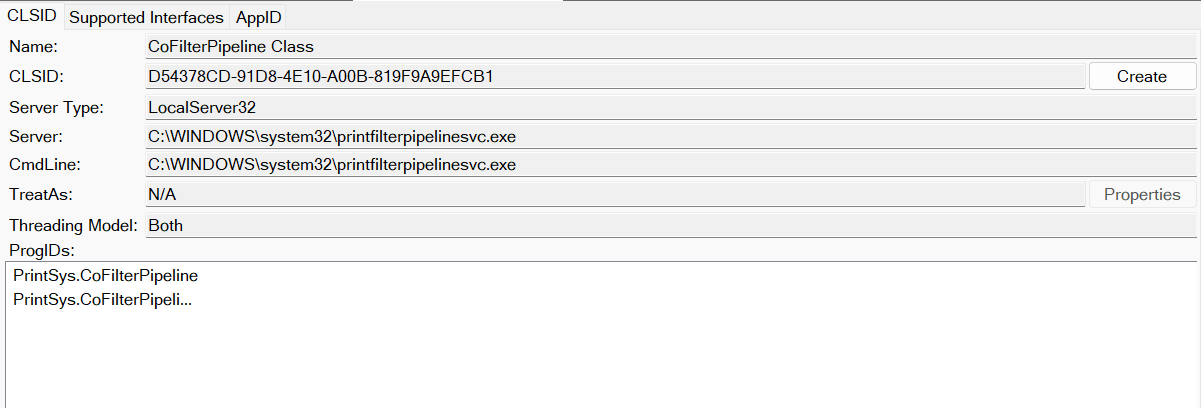
If we check the AppID, we can see that this COM object is not packaged as a service. However, it runs under the identity of the Local Service account for some unknown reason. :)
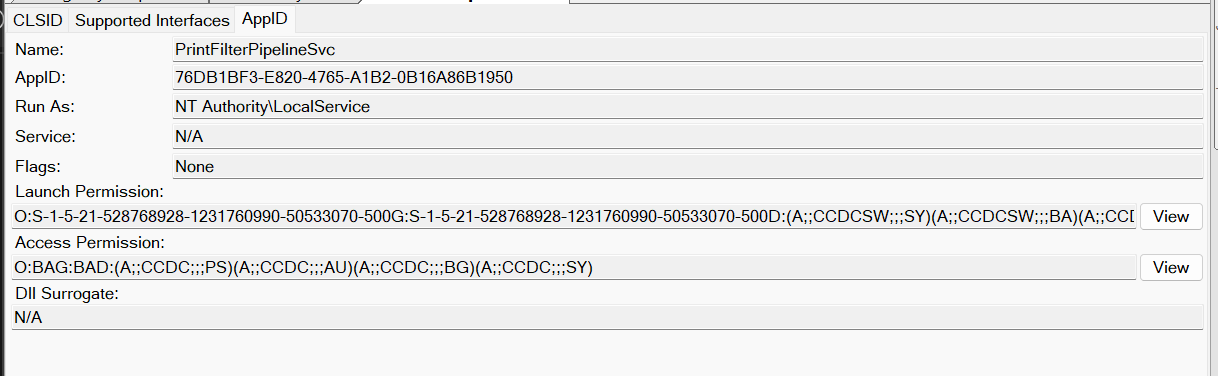
If we check the launch permissions, we can see that low-privileged users can launch this object and access it as well.
Now the question is: how can we weaponize this COM object and use it in our exploits?
The tricky part here is that this object allows low-privileged users to execute code in the Local Service context rather than SYSTEM. This is different from the object used in RedSun. However, this is still a privilege escalation because the Local Service token has the SeImpersonatePrivilege privilege, which can be used to achieve a SYSTEM token.
However, there is one important problem we need to solve when weaponizing this COM object into exploits such RedSun.
Not just a copy:
When you copy a file to a folder in Windows, if you have permission to copy the file there, the destination file will inherit the DACL of the parent directory.
So, in a normal situation, if you have permission to copy a file to System32 (for example, if you are an administrator), the executable will have a DACL like the one shown below.
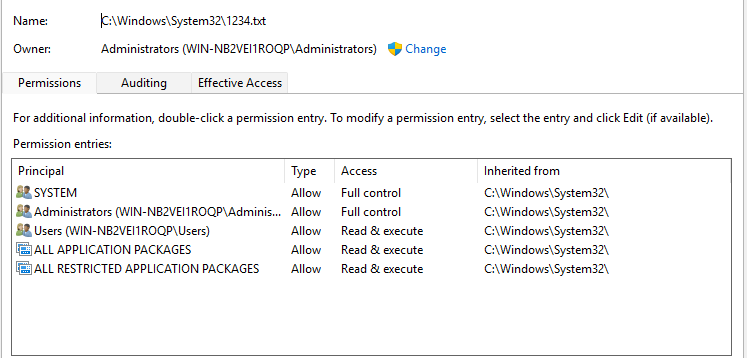
As you can see, the file inherits the permissions from the System32 folder, and the owner of the file, as expected, is Administrator because the administrator copied it.
However, for a normal executable inside System32, we will see the same DACL, but the owner will be TrustedInstaller instead of Administrator. As an example, here is the DACL for printfilterpipelinesvc.exe.
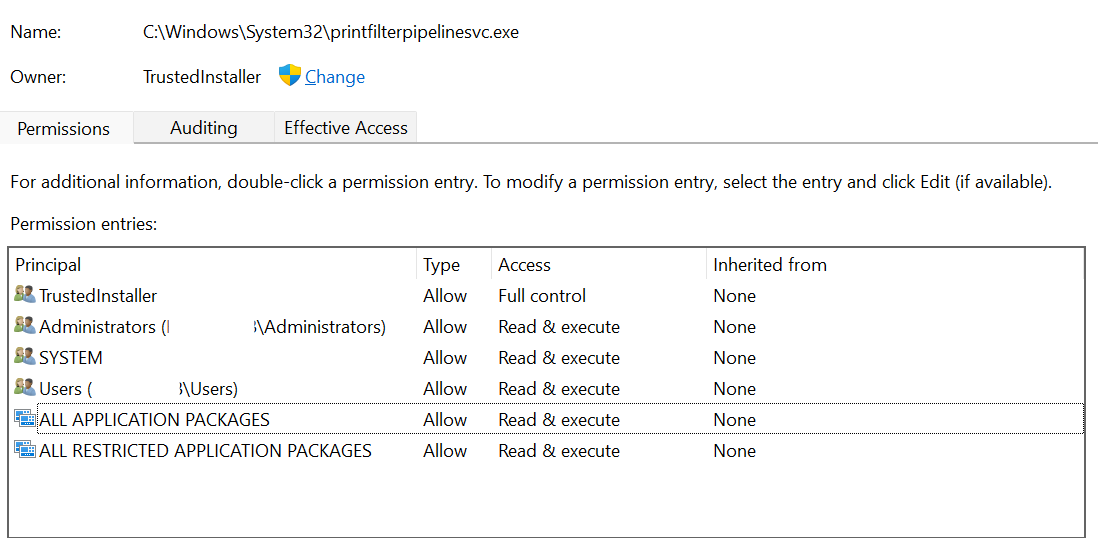
As you can see, the DACL is the same, but now TrustedInstaller is the owner.
Now, for printfilterpipelinesvc.exe to be launched as Local Service when the COM object is activated, the LOCAL SERVICE account must have Read & Execute permission on the file itself on disk, regardless of the COM launch permissions.
However, we cannot see this account inside the DACL above. The permission for this account is not explicitly included in the DACL. However, the Users group contains Authenticated Users, which in turn exists in the token of LOCAL SERVICE.
Now, when the RedSun exploit copies the exploit to System32 and replaces the legitimate executable, the DACL will look different, as we can see in the photo below.
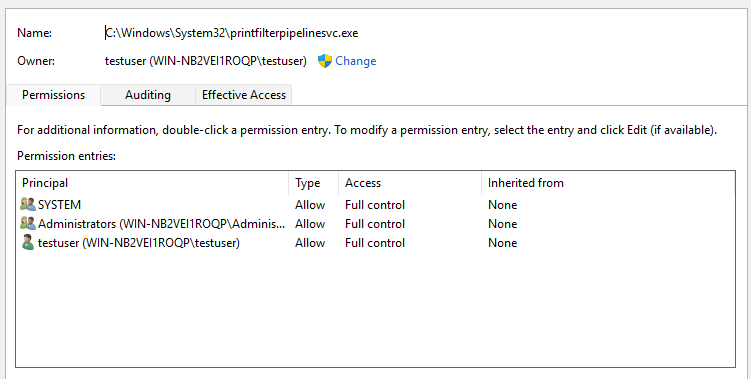
As you can see, the Users group no longer exists. When we trigger the COM activation from the exploit, we will get an Access Denied error because Local Service does not have Read & Execute permission on this file.
However, the solution is really simple.
If you look at the DACL again, we can notice that the owner of the file is testuser, which is the low-privileged user we use to run the exploit.
tbh, I expected the owner to be SYSTEM because the file copy is handled using Defender and the Cloud API. However, it seems that the owner stays as the original owner of the exploit (testuser in our case).
Because we are the owner, we can use a simple function inside the exploit, after copying the exploit to System32 and before triggering the COM activation, to give the Local Service account full control over the file.
In this case, we can avoid the Access Denied error, and the exploit will run as Local Service, allowing us to successfully escalate our privileges.
2- Data Protection Shield COM object:
If you look through the script's results, you'll notice many COM objects — present on both Windows 11 and Windows Server 2025 — that fit our theory and could serve as the escalation. But there are some exceptions.
One of them is a COM object called Data Protection Shield, whose server is C:\Windows\System32\SecurityHealthService.exe. If you try to weaponize it by replacing that executable with your own, you'll hit an error like this:
Program 'SecurityHealthService.exe' failed to run: Windows cannot verify the digital signature for this file. A recent hardware or software change might have installed a file that is signed incorrectly or damaged, or that might be
malicious software from an unknown sourceAt line:1 char:1
+ C:\Windows\System32\SecurityHealthService.exe
+ ~~~~~~~~~~~~~~~~~~~~~~~~~~~~~~~~~~~~~~~~~~~~~.
At line:1 char:1
+ C:\Windows\System32\SecurityHealthService.exe
+ ~~~~~~~~~~~~~~~~~~~~~~~~~~~~~~~~~~~~~~~~~~~~~
    + CategoryInfo          : ResourceUnavailable: (:) [], ApplicationFailedException
    + FullyQualifiedErrorId : NativeCommandFailed
what this means?
Some Windows executables are required to pass a digital signature check before they're allowed to run. If you edit or replace such a binary, the OS can no longer verify its signature, and execution fails with the error above.
A quick way to tell whether a binary is signed is to check the Digital Signatures tab in the file's Properties dialog, if the tab is present, the file carries a signature.
The screenshots below compare the properties of TieringEngineService.exe and SecurityHealthService.exe:
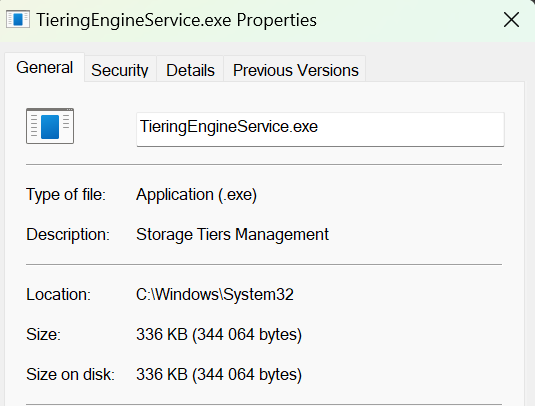
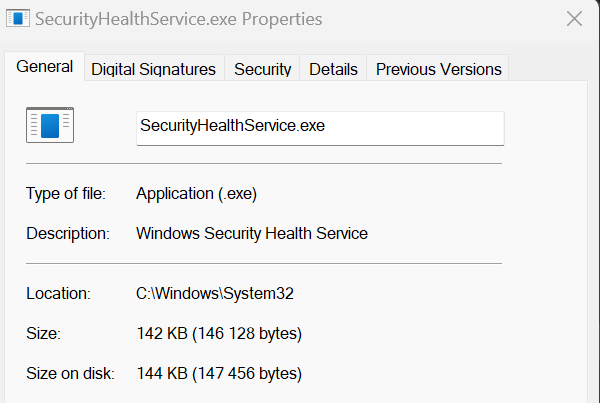
As you can see, SecurityHealthService.exe has a Digital Signatures tab, while TieringEngineService.exe does not. Inspecting that tab shows the binary is signed by Microsoft:
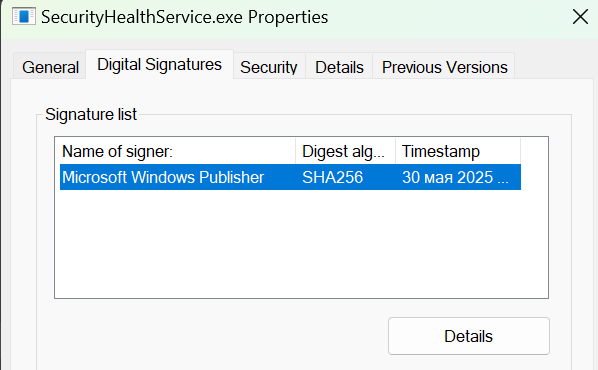
This object isn't the only one protected this way, many of the objects in the script's results share the same property, and they can't be weaponized by replacing their backing executable.
3- PerceptionSimulationCoClass COM object:
This COM object exists only in Windows 11, and it is packaged as a service called Windows Perception Simulation Service.
The service description is:
Enables spatial perception simulation, virtual camera management and spatial input simulation
This COM object has the CLSID 3AD33743-429F-4DE2-8B95-58FA5C727515 and its server is located at:
C:\Windows\System32\PerceptionSimulation\PerceptionSimulationService.exe
As shown in the photo below.
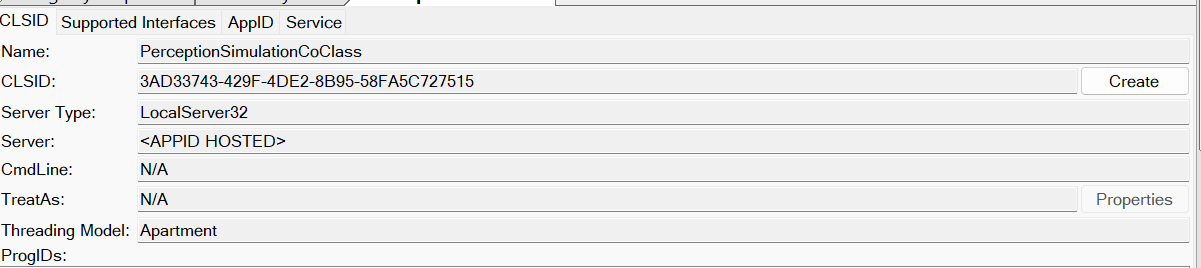
If we check the AppID, we can see that it is packaged as a service, and low-privileged users (NT AUTHORITY\INTERACTIVE) can launch and access it.
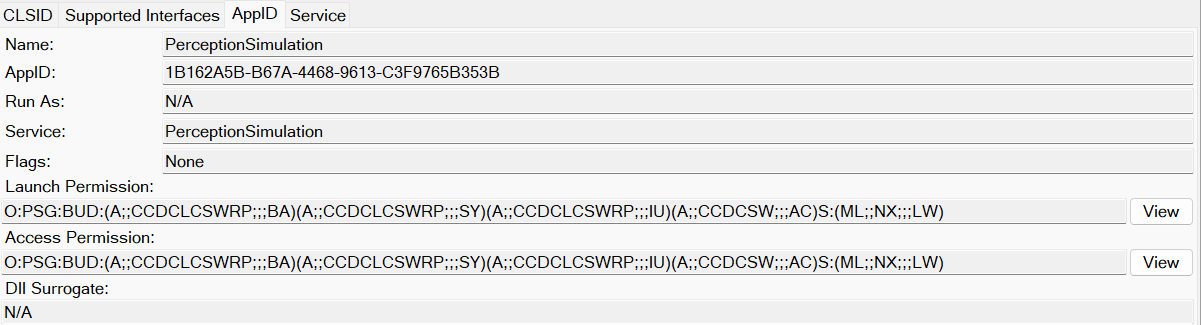
The service associated with this COM object runs under the SYSTEM account.
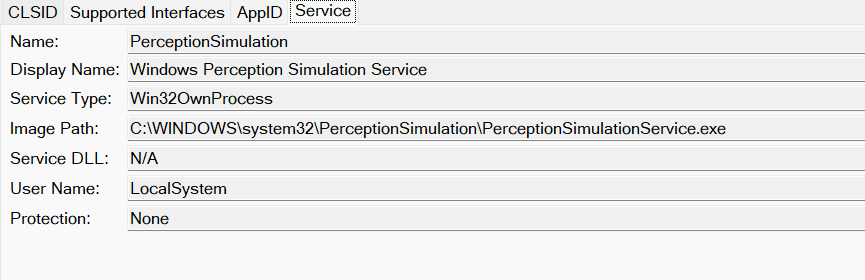
This object does not require any special modifications if you want to weaponize the RedSun with it.
4- Diagnostics Hub Standard Collector Service COM object
This is the second COM object that exists only in Windows 11. It is also packaged as a service called Microsoft (R) Diagnostics Hub Standard Collector Service, which Microsoft describes as:
Diagnostics Hub Standard Collector Service. When running, this service collects real time ETW events and processes them
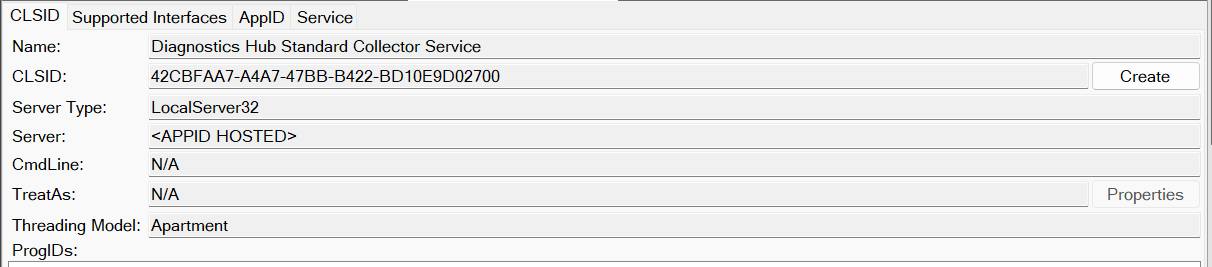
It has the CLSID 42CBFAA7-A4A7-47BB-B422-BD10E9D02700, and the server is located at:
C:\Windows\System32\DiagSvcs\DiagnosticsHub.StandardCollector.Service.exe
If we check the AppID, similar to the previous object, we can see that low-privileged users (NT AUTHORITY\Authenticated Users) can launch and access it.
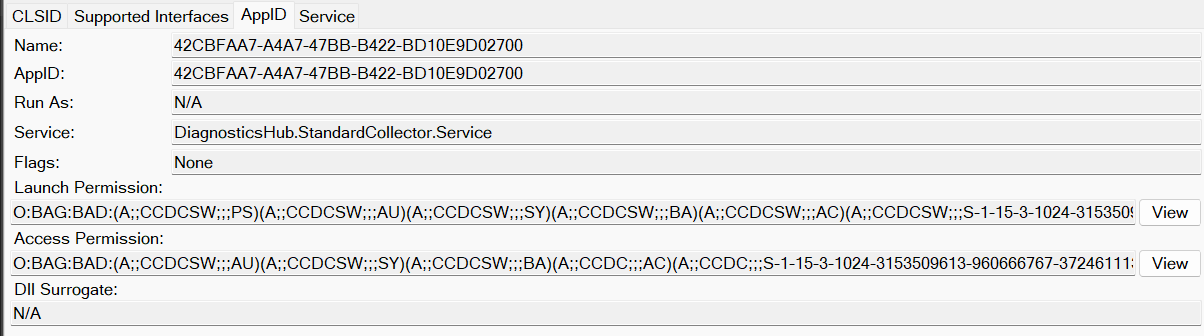
The service also runs under the SYSTEM account.
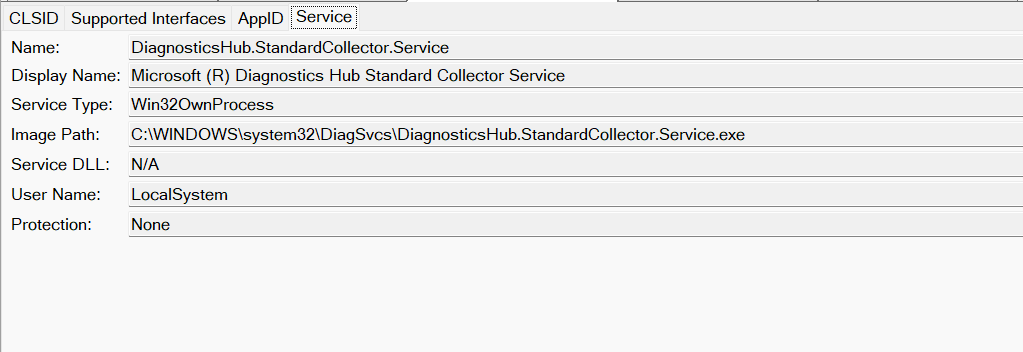
However, if we replace the server executable with a malicious executable and trigger the COM object, we can see that the resulting process does not receive the full set of SYSTEM token privileges. Instead, it only has the following three privileges:
SeImpersonatePrivilege
SeSystemProfilePrivilege
SeDebugPrivilege
There may also be SeChangeNotifyPrivilege, which is enabled by default in almost all Windows access tokens.
To confirm which privileges are configured for the Microsoft (R) Diagnostics Hub Standard Collector Service, we can use the following command:
C:\Windows\System32>sc qprivs diagnosticshub.standardcollector.service
[SC] QueryServiceConfig2 SUCCESS

SERVICE_NAME: diagnosticshub.standardcollector.service
        PRIVILEGES       : SeImpersonatePrivilege
                         : SeSystemProfilePrivilege
                         : SeDebugPrivilege
This shows that the service is configured to run with only these three privileges. Windows therefore restricts the privileges available to the process launched by the service, even though the service itself runs under the SYSTEM account. This explains why our malicious executable receives only these three privileges instead of the full set of privileges normally associated with a SYSTEM token.
Among these privileges, SeDebugPrivilege is particularly interesting. It allows a process to debug and interact with other processes, including processes running under the SYSTEM account. This privilege can be abused to obtain a SYSTEM token.
5- CRemoteAppLifetimeManager COM object:
This COM object also exists only in Windows 11 and runs under the NETWORK SERVICE account. Therefore, most of the techniques we discussed for CoFilterPipeline also apply to this object. The main difference is that this object runs as NETWORK SERVICE rather than LOCAL SERVICE.
The object has the CLSID 0BAE55FC-479F-45C2-972E-E951BE72C0C1, and its server executable is located at: C:\Windows\System32\RemoteAppLifetimeManager.exe
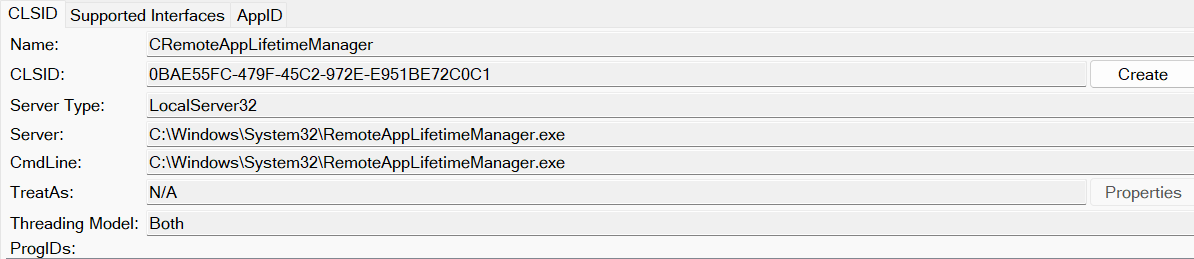
If we check the AppID, we can see that low-privileged users (Everyone) can launch and access this COM object.
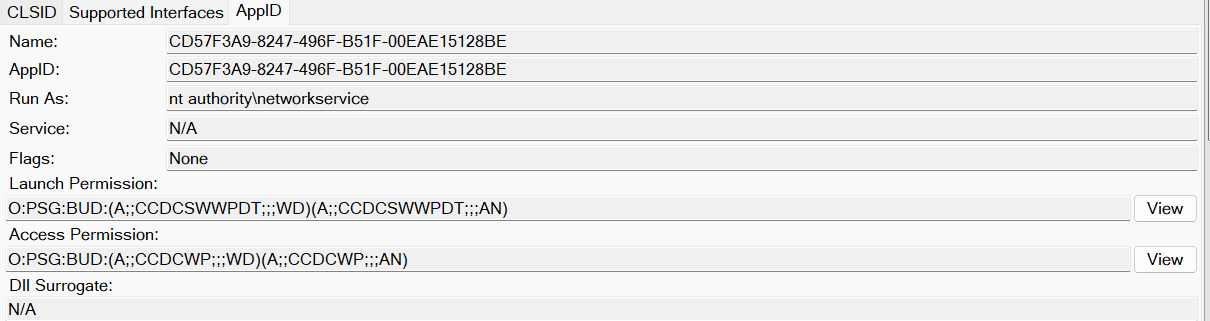
To weaponize this COM object, we can follow the same steps we used for CoFilterPipeline. The main difference is that the resulting process runs under the NETWORK SERVICE account instead of LOCAL SERVICE.
The NETWORK SERVICE token also has SeImpersonatePrivilege, which can be used to perform a privilege escalation to SYSTEM.
As far as I know, the way COM is used in RedSun to achieve command execution from a filesystem write is unique. I have not seen any write-ups or research discussing this technique. However, it is possible that some malware has used a similar technique before, and I am simply not aware of it.
Thanks for reading this blog post, and see you in the next part!